🎙️ Desktop AI Voice Studio

AI Voice Studio
You Own Forever

Create studio-quality AI voiceovers for videos, ads, podcasts, and more — without installing software and without monthly fees.

✔ Desktop-based AI voice studio
✔ Download once. Use anytime.
✔ Powered by ChatGPT’s official voices
✔ One-time payment. Lifetime access.
🔊 Hear a real AI voice (10 sec)
0:00
Instant access • No subscription • Desktop use

Built for creators, marketers, founders, and agencies
who need voiceovers on demand — without subscriptions.

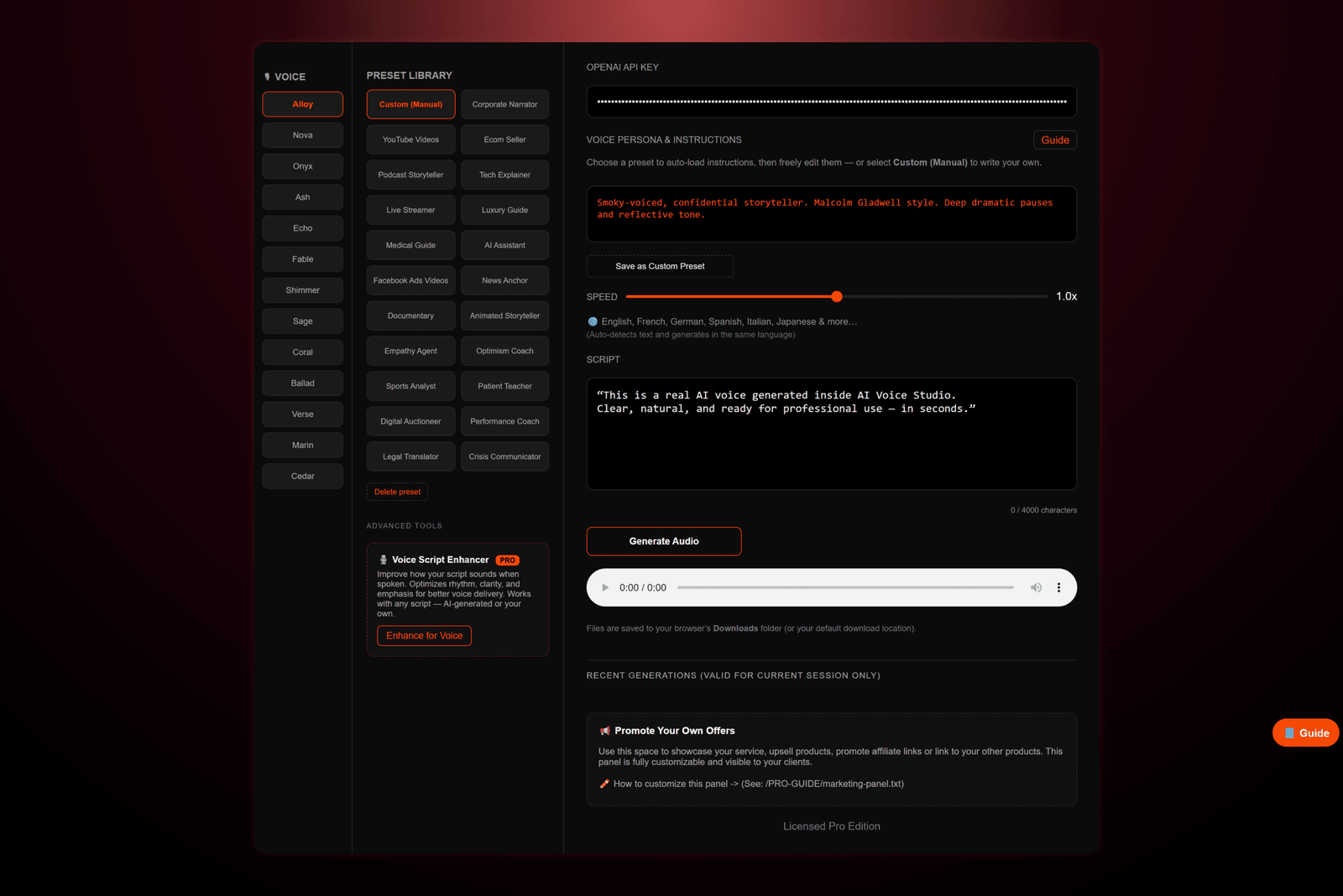
This Is the Actual Desktop Studio

Runs locally on your machine. Opens in your browser. No SaaS dashboard. No rented interface.

AI Voice Studio Desktop App Interface
Real interface • Real controls • Full ownership
What Makes AI Voice Studio Different

This Is Not Another Subscription Tool

Most AI voice tools lock you into monthly plans, usage limits, and platforms you never truly own.

AI Voice Studio is different

  • No subscriptions
  • No forced logins
  • No usage limits from us
  • No rented access
You pay once — and the studio is yours for lifetime.

A Real Desktop VoiceOver Studio
— Not a Chat Tool

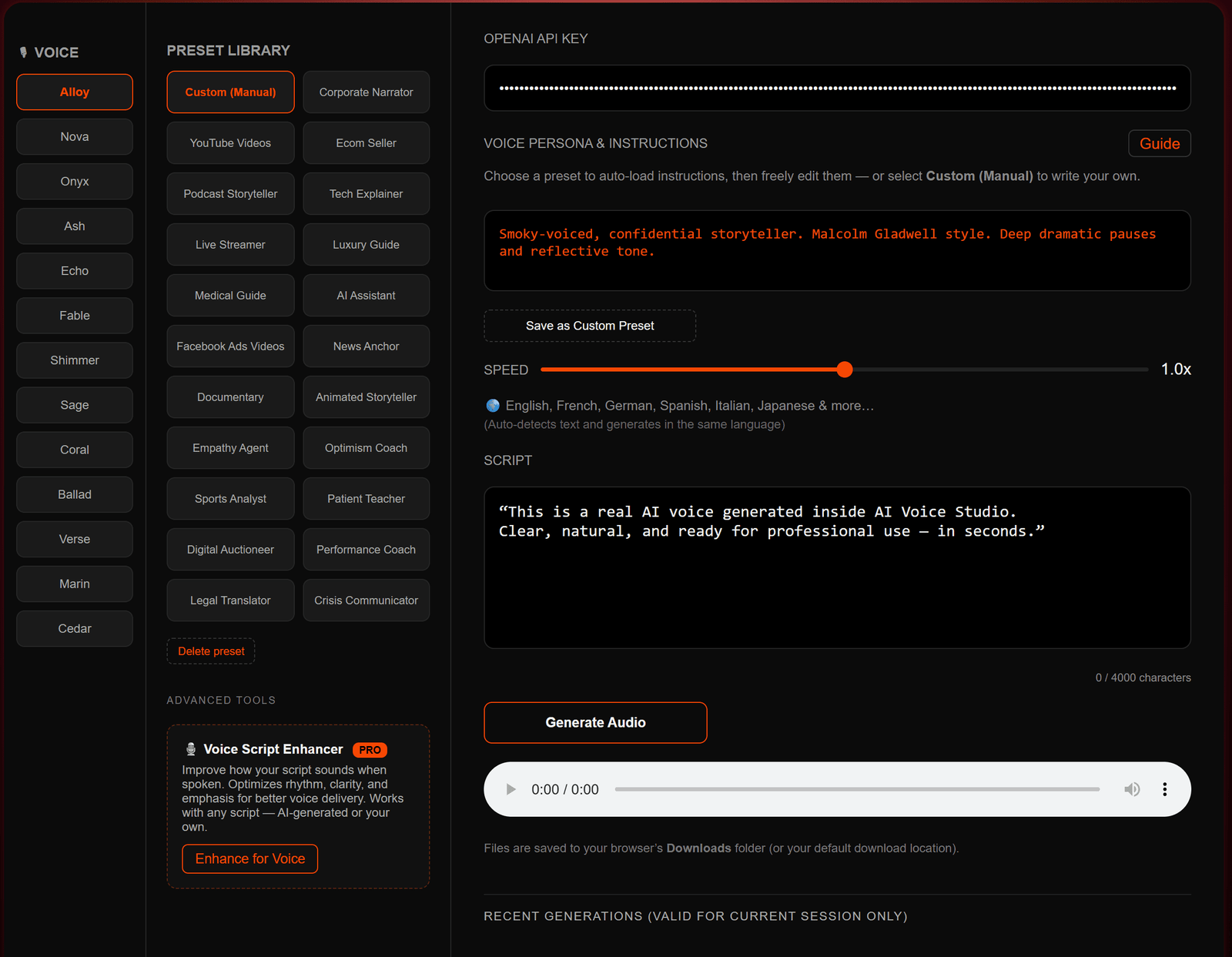
Generate professional voiceovers in minutes — using a real interface, real controls, and your own API key.

  • Download the studio app
  • Open app in your browser
  • Paste your OpenAI API key
  • Generate voiceovers instantly
AI Voice Studio Interface
🎧 Generated inside AI Voice Studio
0:00

Creative Control You Actually Own

Same ChatGPT voice engine — but here, instructions change how the voice sounds, feels, and performs.

“Scroll-stopping promotional voice.
Use cases: DTC product videos, lead gen.”
Preset: Facebook Ads
“Unfiltered energy for real-time engagement.
Use cases: Gaming streams, QA sessions.”
Preset: Live Streamer
“High-intensity motivational voice for peak performance.
Use cases: Workout programs, athletic training videos.”
Preset: Performance Coach
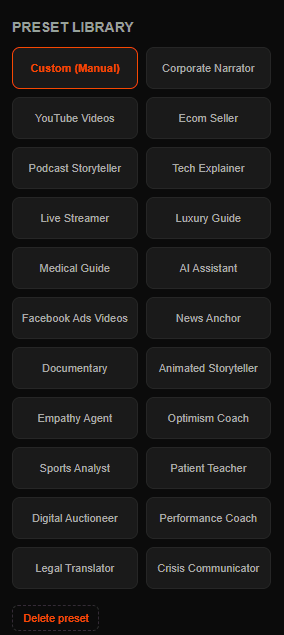
Voice Presets Panel
Presets load instructions automatically.
You can edit them or write your own.
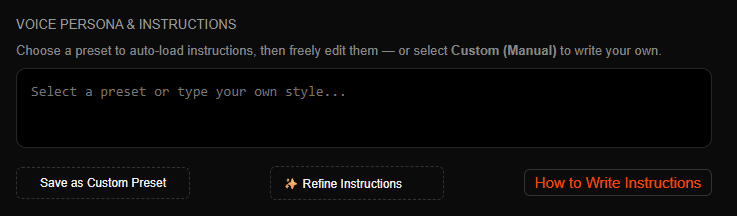
AI Voice Studio – Custom Instructions UI
Write instructions once. Generate professional delivery every time.

Most AI voice tools read text. AI Voice Studio follows direction.

13 Natural Voices. 50+ Languages.

Same studio. Same workflow. Global-ready voiceovers.

English
Spanish
French
German
Hindi

Language is auto-detected. Output matches the input language.

Who AI Voice Studio Is Built For

If you need voiceovers regularly, this replaces tools, subscriptions, and freelancers.

Creators

  • 🎥 YouTubers
  • 🎙️ Podcasters & storytellers
  • 🎮 Streamers & short-form creators

Marketers

  • 📢 Ad creators & media buyers
  • 🛒 E-commerce sellers
  • 🤝 Affiliate marketers

Professionals

  • 🧠 Agencies & freelancers
  • 📚 Educators & trainers

Personal

  • 👨‍👩‍👧 Learning & family use
  • 🧪 Experimentation & fun
Even if you’re just experimenting — this is a powerful tool to own.

One Payment. Own It Forever.

No subscriptions. No upsells. You own the studio — not just access to it.

Personal License

$17 Lifetime
Best for creators & personal projects.
  • Desktop AI Voice-Over Studio
  • 13 natural AI voices
  • 10 voice presets
  • Custom voice instructions
  • Commercial voiceover usage
  • Personal use license
  • No Resale or Redistribution rights
Most Popular

Business License

$37 Lifetime
Built for agencies, freelancers & product sellers.
  • Everything in Personal License
  • 20 advanced voice presets
  • Save unlimited custom presets
  • AI Script Enhancer
  • Lifetime app updates
  • Resell & redistribution rights
  • Sell the app as a digital product
  • White-label (no branding)
No fake bonuses. No inflated “$999 value” math. Just a real desktop app that works — priced so you can actually afford to own it.

How It Works — 2 Minutes to First Voice

  1. 1️⃣ Download the AI Voice Studio App
  2. 2️⃣ Open in your browser
  3. 3️⃣ Enter your OpenAI API key
  4. 4️⃣ Paste your script
  5. 5️⃣ Generate & download audio
No installation. No setup headaches. No learning curve.
Desktop-focused tool. Purchase on mobile — use on desktop anytime.

FAQ — Important

Is this a subscription?

No. AI Voice Studio is a one-time purchase. You own the software forever — no monthly fees, no renewals.

Can I monetize the voiceovers I generate?

Yes. All plans allow commercial use of the generated voiceovers. You can use them in videos, ads, client work, products, or services.

What’s the difference between commercial use and resell rights?

Commercial use (included in all plans) means you can sell voiceovers.

Pro users also get resell rights — meaning you can sell the AI Voice Studio app itself as a digital product, white-label it, and keep 100% of the profit.

Do I need to install anything?

No traditional installation is required. You download the studio app and open them in your browser. It runs locally on your desktop or laptop.

Is my data stored online?

No. The interface runs locally on your machine. Your scripts, settings, and usage stay on your system. The OpenAI API key is entered by you and used only for generation.

Do I need to buy OpenAI credits?

Yes. You purchase OpenAI credits directly from OpenAI. Credits start from $5 and never expire.

How much does voice generation cost?

Typical usage is approximately $0.015 per minute (official OpenAI pricing).

$5 in credits = 5+ hours of voice generation. No markups. No hidden fees.

Can I use this on mobile?

The studio is designed for desktop use. You can purchase on mobile, but actual usage is best on a computer.

What is the refund policy?

Due to the digital nature of this product, refunds are only considered if you are unable to install or use the studio on a compatible desktop system.

Voice quality and output depend on OpenAI’s engine and the instructions you provide, so refunds are not issued based on generated audio results.

One-Time Deal — Lifetime Access

No renewals. No subscriptions. No future upgrades required.

Instant access • Desktop use • Lifetime ownership