Local AI VoiceStudio

Create Your AI Voices. Generate Audio Locally.

100% Offline AI Generation. No Cloud APIs. No Credits.

Turn your scripts into voiceovers, podcasts, stories, and audiobooks—all powered locally on your computer.
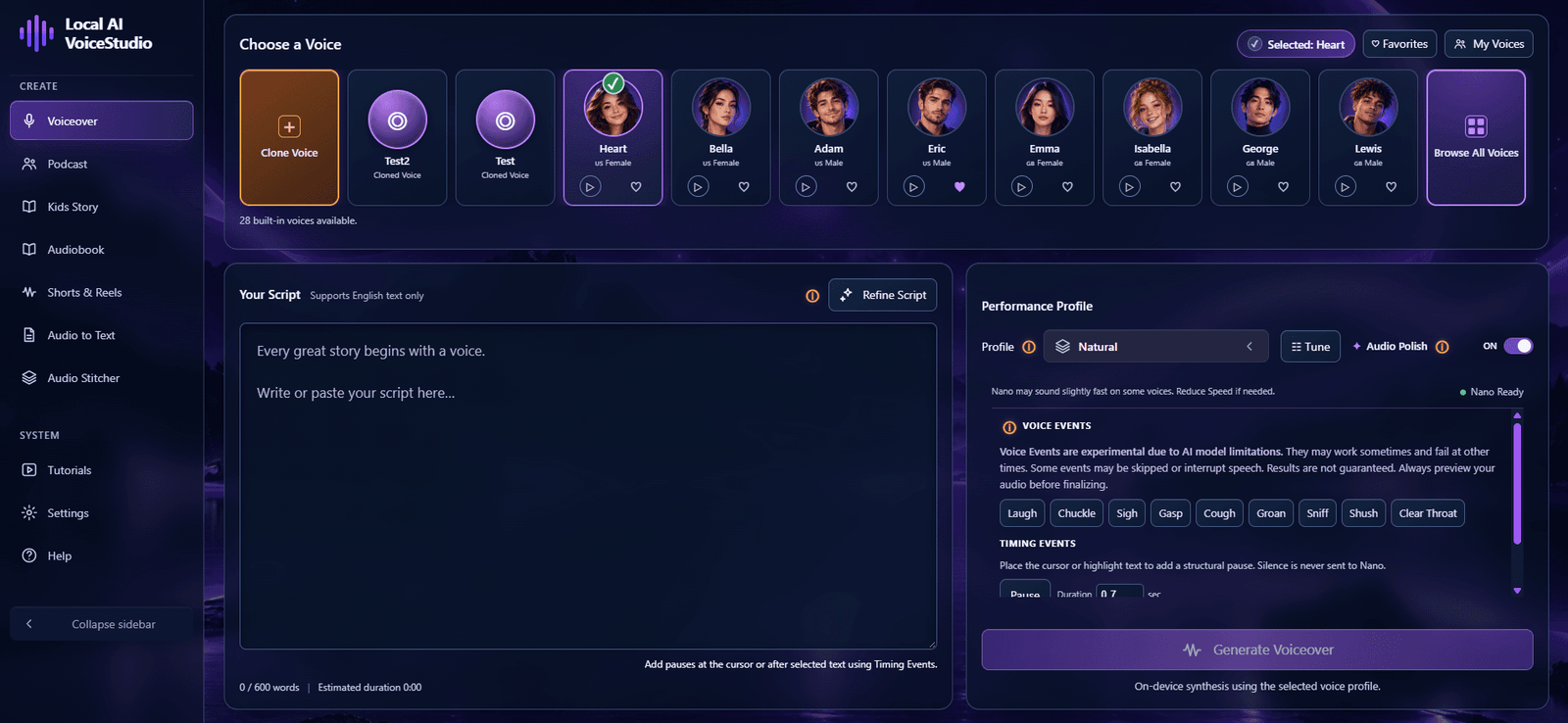
Local AI VoiceStudio application demonstration WATCH VOICESTUDIO IN ACTION Real Local AI VoiceStudio application walkthrough
Video unavailable? Watch on YouTube
✓ Windows & macOS
✓ Runs Locally
✓ Opens in Google Chrome
✓ English Only
Creator $54 Agency $145 One-Time Purchase · No Monthly Generation Fees

Hear What You Can Create.

Voiceover Audio Demo
0:00 / --:-- Ready
Podcast · 3 Speakers Audio Demo
0:00 / --:-- Ready
Kids Story Audio Demo
0:00 / --:-- Ready
Audiobook Audio Demo
0:00 / --:-- Ready
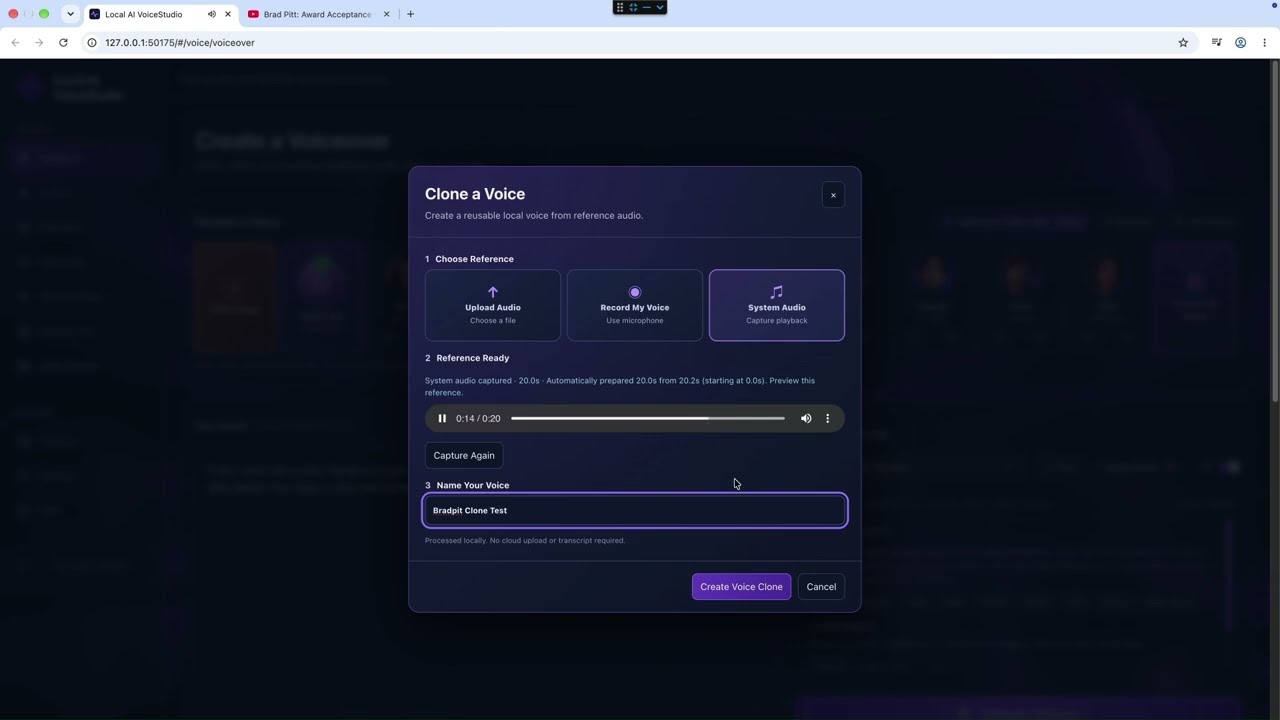
Voice Reference

Turn Voice Recordings Into AI Voices.

Create new narrations with the tone and character of a voice you love.

↑ Upload Audio
WAV / MP3
◉ Record Your Voice
Microphone
≋ Capture System Audio
System Audio
Your Voice Library Ready
AI
Custom Voice Created from your reference audio
Reusable across VoiceStudio Saved locally ✓
See the Workflow

Watch How a Voice Is Created

Voice similarity varies. Use only recordings you own or have permission to use.

28 Built-In Voices. Your Own Voice Library.

Start with ready-to-use voices or create and reuse new voice styles across your creative studios.

Local AI Engine

Your Own AI Voice Engine. No Credits. No Limits.

Generate locally. Create freely. Never pay per generation.

Your Computer
Processing locally
Engine Ready

Local AI Voice Engine

Generate
∞ Voice Generations
Credits None
Per-minute fee $0
Daily quota None
∞

No Credits. No Daily Quotas.

◈

Create Without the Cloud.

◉

Your Content Stays Yours.

How You Create

From Your Idea to Finished Audio. Made Simple.

Not just text-to-speech. Dedicated workflows that help you create everything from quick voiceovers to multi-speaker conversations and full audiobooks.

01 — Voiceover Studio

Your Script. Your Voice. Your Style.

Paste your script, choose a built-in or reference-inspired voice, and fine-tune the delivery. Generate narration that fits your videos, tutorials, presentations, or creative projects.

Choose → Customize → Generate
Hear the Result Actual VoiceStudio output
Voiceover Sample 0:00 / --:--
Ready
Voiceover Studio Local
1 Choose
2 Customize
3 Generate
Choose a Voice 28 available
Heart
Bella
Adam
George
Your Script

Every great story begins with a voice...
Natural Profile
Tune
Generate Voiceover
Podcast Studio Up to 3 Speakers
1 Dialogue
2 Speakers
3 Generate
Heart Host
George Guest
Host: Welcome to the show.
Guest: Thanks for having me.
Host: Let's get started.
Generate Podcast
02 — Podcast Studio

Your Conversations. Multiple Voices.

Turn written dialogue into a podcast-style conversation with up to three speakers. Assign each speaker a voice, organize the conversation into parts, and generate your spoken content.

Add Dialogue → Assign Speakers → Generate
Hear the Result Choose speaker count
Podcast — 3 Speakers 0:00 / --:--
Ready
03 — Kids Story Studio

Every Character Has a Voice.

Bring your stories to life with a narrator and up to three characters. Assign voices to the storyteller and characters, organize the story into scenes, and generate a multi-voice narration.

Add Story → Assign Characters → Generate Scenes
Hear the Result Actual VoiceStudio output
Kids Story Sample 0:00 / --:--
Ready
Kids Story Studio Narrator + Characters
1 Story
2 Characters
3 Scenes
Narrator
Heart Narrator
Character 1
George Luna
Character 2
Bella Tuna
Narrator: Luna looked out of her window.
Luna: Wow! That star is moving!
Generate Scenes
Audiobook Studio Chapter Workflow
1 Manuscript
2 Chapters
3 Generate
Heart
Narrator
Audiobook Style
01 The Beginning
02 The Journey
03 A New Morning
Chapter 1 — It was a cold winter morning...
Generate Chapter
04 — Audiobook Studio

Your Book. One Chapter at a Time.

Turn manuscripts and longer scripts into narrated audio. Work chapter by chapter, choose your voice, and manage longer narration without handling everything as one enormous script.

Add Manuscript → Organize Chapters → Generate
Hear the Result Actual VoiceStudio output
Audiobook Sample 0:00 / --:--
Ready
05 — Short / Reel Studio

Short Scripts. Big Possibilities.

Create spoken narration for YouTube Shorts, reels, promos, and other short-form content. Add your script, select a voice, and generate audio for your next video.

Add Script → Choose Voice → Generate
Hear the Result Actual VoiceStudio output
Shorts / Reel Sample 0:00 / --:--
Ready
Short / Reel Studio Short Form
1 Script
2 Voice
3 Generate
Heart
Selected Voice
Energetic
Tune
Flexible
Target Length
Hook: Most people waste hours creating voiceovers.

Body: Here's a faster way.
Prepare Short
Audio to Text Whisper AI
1 Import
2 Transcribe
3 Text
Drop audio files here WAV · MP3 · MP4 · M4A
Choose Audio
Record Audio
System Audio
06 — Audio to Text

From Recording to Transcript.

Import or record supported audio and turn speech into written text using Whisper AI running locally on your computer.

Import or Record → Transcribe → Get Text
Your Content. Your Creative Workflow. One Desktop Studio.
Smart Section Generation

Create Long-Form Audio. Without Starting Over.

Big scripts, smaller sections, and the freedom to change only what you need.

One Long Script Audiobook / Story
↓
Part 01 ✓ Keep Audio
▶
Part 02 Edit & Retry
▶
Regenerate Part 02
Part 03 ✓ Keep Audio
▶
Keep Your Approved Sections Part 01 + Part 03 stay untouched
→
Regenerate Only What Changed Only Part 02 is generated again
01

Break It Into Sections

02

Generate at Your Pace

03

Change Only What Needs Changing

Keep the good parts. Fix the rest. No need to start from scratch.
Runs on Your Computer

Run AI Voices Locally. No High-End PC Required.

You don't need an expensive computer or dedicated graphics card to start creating with VoiceStudio.

Tested Hardware

Tested on a 5-Year-Old Laptop.

Intel Core i3 8GB RAM Windows

No Dedicated GPU Needed

Supported voice-generation workflows run directly on your computer's processor.

Built for Windows & macOS

VoiceStudio supports Windows PCs, Intel Macs, and Apple Silicon Macs through its local browser-based interface.

English OnlyChrome Recommended for VoiceStudio
Your Hardware. Your Generation Speed.Create locally at a pace your computer can handle. Faster hardware can improve generation performance.

Download. Extract. Double-Click.

No complicated installation. No Python setup. No separate AI model downloads.

Download the complete VoiceStudio package, extract the folder, and double-click the launcher. VoiceStudio starts its local AI engine and opens its interface in Google Chrome.

01 Download
02 Extract
03 Double-Click
First startup may take approximately 5–7 minutes, depending on your computer.
Simple One-Time Pricing

One Payment. Your Own AI Voice Studio.

Create locally. No monthly generation fees. No credits to replenish.

Choose the license that fits your creative work or business.

Creator License

Creator

Create AI voice content for your own projects.

$54
Launch Price Regular $74
Everything you need to create:
✓ Complete VoiceStudio desktop application
✓ All six creative and transcription workflows
✓ 28 built-in voices and custom voice references
✓ Smart Section Generation and Audio Stitcher
✓ Local AI generation without metered credits
✓ Supported audio customization and export tools
Compatible with macOS and Windows
Get Creator License→

One-time purchase. No recurring voice-generation fees.

Agency License White Label + Resell

Agency

Your Own AI Voice Software Business. Ready to Sell.

$145
Launch Price Regular $175
Everything in Creator, plus:
✓ White-Label Software
✓ Resell to Your Customers
✓ Sell on Gumroad, Payhip, Shopify & eBay
✓ Use in Courses & Communities
✓ Bundle Into Client Offers
✓ Keep Your Sales Revenue
✦ Exclusive Agency Bonus

Reseller Setup Guide — Included

A practical, step-by-step guide to help you prepare your software listing and start selling through platforms such as Gumroad, Payhip, Etsy, and more.

Compatible with macOS and Windows
$175 $145 Single Payment!
$30 Discount Applied · Regular Price $175
Get Agency License→

One-time purchase. Resale, distribution, and bundling rights are subject to the Agency License agreement and applicable marketplace rules.

One-Time Purchase
No Generation Credits
Windows & macOS
Local AI Generation
Frequently Asked Questions

Got Questions? We've Got Answers.

Everything you need to know before getting started with Local AI VoiceStudio.

Yes. VoiceStudio runs its AI voice-generation and transcription engines locally on your computer, not on cloud AI servers.

Once installed and set up, you can generate audio without an internet connection. Internet access may be needed for initial setup, activation, or updates.

No. VoiceStudio doesn't charge per generation, minute, or character.

There are no credits to purchase, daily generation quotas, or per-minute generation fees imposed by VoiceStudio.

Generate as much as your computer can handle.

No. VoiceStudio supports CPU-based voice generation without a dedicated graphics card.

We've tested it on a five-year-old Windows laptop with an Intel Core i3 processor and 8GB RAM.

Generation speed varies depending on your computer's configuration.

VoiceStudio is designed for Windows PCs, Intel Macs, and Apple Silicon Macs.

It uses a browser-based interface while running its AI engines locally on your computer.

Google Chrome is recommended for the best experience.

VoiceStudio V1 supports English only for AI voice generation.

Additional voice-generation languages are not included in the initial release.

VoiceStudio lets you use suitable audio recordings as references to generate speech with similar vocal characteristics, including tone and texture.

It does not guarantee a perfect or identical voice replica. Results depend on the reference and recording quality.

Only use recordings you own or have permission to use.

Yes. VoiceStudio includes dedicated workflows for longer audio projects.

Its Smart Section Generation workflow organizes supported content into smaller sections, allowing you to generate, review, and refine individual parts.

Yes. In supported workflows, you can edit and regenerate individual sections while keeping previously generated audio that doesn't need changing.

Audio Stitcher helps you combine multiple audio clips into one continuous recording.

It's useful for bringing together narration sections, audiobook chapters, podcast segments, and other audio projects.

Commercial use is permitted according to your purchased license and the rights you hold to your scripts, recordings, and voice references.

You must have permission to use any third-party content or voices.

No. VoiceStudio is available as a one-time purchase.

There are no monthly VoiceStudio voice-generation subscription fees or credits to replenish. Updates and support are governed by the applicable license terms.

Creator License — $54 Launch Price

Includes the complete VoiceStudio application and all creative workflows for your own projects.

Agency License — $145 Launch Price

Includes everything in Creator, plus permitted white-label resale rights. You can offer the software through eligible marketplaces, courses, communities, or client bundles under the Agency License terms.

Agency customers also receive the Reseller Setup Guide.

No. The Agency License permits you to resell the software under the applicable agreement.

Your customers receive end-user rights, not the right to resell or redistribute the software themselves.

Google Chrome is recommended.

VoiceStudio uses a browser-based interface, but its AI generation and transcription run locally on your computer rather than through a cloud AI service.

Due to the digital nature of Local AI VoiceStudio and immediate download access, all sales are final, subject to applicable consumer protection laws.

Please review the product demo and check your system compatibility before purchasing.

Recommended hardware: Intel Core i3 or equivalent processor (modern generation), with at least 8GB RAM.

Your download link is available immediately after purchase.

Local AI. One-Time Purchase. Built to Create on Your Computer.
Local AI VoiceStudio

Your Own AI Voice Studio. Ready When You Are.

Create AI voices, bring your ideas to life, and generate locally without worrying about credits or monthly fees.

One-Time Purchase
No Generation Credits
Private by Design
Windows & macOS · English Only · Works Best with Google Chrome
Link copied